

Building a Chat Room in Python

Graduated in 2021. Later worked as an Associate for 6-months in MNC. Later joined the fellowship at BootCamp in backend development. Currently preparing for interviews.

Chat rooms are a popular way for people to communicate and interact with each other in real time over the Internet. In this article, we will explore how to build a simple chat room using Python, specifically focusing on the socket and threading modules. We will examine the provided code that implements a server and client for the chat room and explain each of the individual functions involved.
Introduction to Socket and Threading
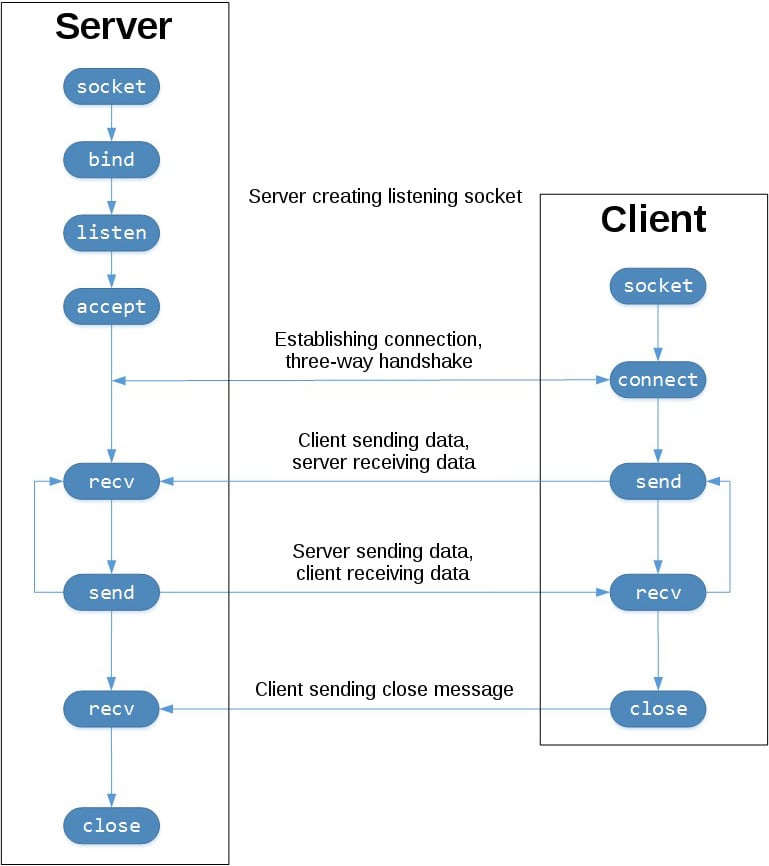
Socket
Sockets are endpoints for communication between two machines over a network. They allow programs to send and receive data across the network. In our chat room implementation, we will use sockets to establish connections between the server and clients.
Python's
socketmodule provides a low-level interface for socket programming. It offers various functions and methods to create and manipulate sockets. We will utilize thesocket.socketclass to create sockets and perform socket-related operations.Threading
Threading is a technique that allows concurrent execution of multiple threads within a single program. Threads are lightweight and independent units of execution that can perform tasks simultaneously. In our chat room implementation, we will use threading to handle multiple client connections and enable concurrent communication.
Python's
threadingmodule provides a high-level interface for creating and managing threads. It offers theThreadclass, which allows us to define thread functions and start them concurrently.
Server Implementation
Initialization
The
Serverclass initializes various attributes such ashost,port,serversocket, a list of disconnected keywords, an empty list of clients, an empty list of nicknames, and a logger for logging server events.
import socket
import threading
import structlog

class Server:
    def __init__(self):
        self.host = socket.gethostbyname(socket.gethostname())
        self.port = 5051
        self.server = socket.socket(socket.AF_INET, socket.SOCK_STREAM)
        self.DISCONNETED = ['q', 'exit', 'close', 'disconnect']
        self.clients = []
        self.nicknames = []
        self.logger = structlog.get_logger()
Broadcasting Messages
The
broadcastmethod sends a message to all clients in the chat room except the client who sent the message. Thebroadcastmethod iterates over the list of connected clients and sends the message to each client except the client who sent the message.
def broadcast(self, msg, client=None):
    for _client in self.clients:
        if _client != client:
            _client.send(msg)
Starting the Server
The
start_servermethod first binds the server socket to the specified host and port using thebindmethod. Then it starts listening for incoming connections using thelistenmethod. Finally, it calls thelistenmethod to handle incoming requests.
def start_server(self):
    self.server.bind((self.host, self.port))
    self.server.listen()
    self.logger.info(f'Server is listening on {self.host}:{self.port}')
    self.listen()
Handling Client Connections
The
handle_clientmethod runs in a loop and continuously receives messages from the client using therecvmethod. If the received message is one of the disconnected keywords, it sets theis_connectedflag toFalseand breaks out of the loop.Otherwise, it broadcasts the received message to all other clients using the
broadcastmethod. Additionally, it logs the total number of active connections using thethreading.activeCount()function.In case of any exceptions during message reception, the client is removed from the list of clients, the socket is closed, and the associated nickname is removed from the list of nicknames. Finally, the method breaks out of the loop.
def handle_client(self, client, addr):
    is_connected = True
    while is_connected:
        try:
            msg = client.recv(1024)
            if msg in self.DISCONNETED:
                is_connected = False
                break
            self.broadcast(msg, client)
            self.logger.info("Total Connections: {}".format(threading.activeCount() - 1))
        except:
            index = self.clients.index(client)
            self.clients.remove(client)
            client.close()
            nickname = self.nicknames[index]
            self.broadcast('{} left!'.format(nickname).encode('ascii'), client)
            self.nicknames.remove(nickname)
            break
Listening for Connections
The
listenmethod runs in an infinite loop, accepting incoming client connections using theacceptmethod of the server socket.Once a connection is established, it sends the message 'GET_NAME' to the client using the
sendmethod to request the nickname of the user. Then it receives the nickname from the client using therecvmethod and decodes it.The received nickname is added to the list of nicknames, and the client socket is added to the list of clients. A welcome message is broadcasted to all clients to notify that a new user has joined. Additionally, a connection message is sent to the newly connected client.
Finally, a new thread is started using the
threading.Threadclass, which calls thehandle_clientmethod to handle the client's messages.
def listen(self):
    while True:
        client, addr = self.server.accept()
        client.send('GET_NAME'.encode('ascii'))
        self.nickname = client.recv(1024).decode('ascii')
        self.nicknames.append(self.nickname)
        self.clients.append(client)
        self.logger.info("Welcome {} to the chatroom".format(self.nickname))
        self.broadcast("{} joined!".format(self.nickname).encode('ascii'), client)
        client.send("{} connected to server!".format(self.nickname).encode('ascii'))
        self.logger.info("Starting thread for {}".format(self.nickname))
        threading.Thread(target=self.handle_client, args=(client, addr)).start()
Client Implementation
Now let's move on to the client-side implementation of our chat room.
Initialization
The
Clientclass initializes various attributes such as the client's nickname (name), the host IP address, the port number, the client socket (client), and a logger for logging client events.
import socket
import threading
import structlog

class Client:
    def __init__(self, nickname):
        self.name = nickname
        self.host = socket.gethostbyname(socket.gethostname())
        self.port = 5051
        self.client = socket.socket(socket.AF_INET, socket.SOCK_STREAM)
        self.client.connect((self.host, self.port))
        self.logger = structlog.get_logger()
Receiving Messages
The
receivemethod runs in a loop and continuously receives messages from the server using therecvmethod. If the received message is 'GET_NAME', it sends the client's nickname to the server using thesendmethod.Otherwise, it prints the received message to the console. If any exceptions occur during message reception, the client socket is closed, and the method breaks out of the loop.
def receive(self):
    while True:
        try:
            message = self.client.recv(1024).decode('ascii')
            if message == 'GET_NAME':
                self.client.send(self.name.encode('ascii'))
            else:
                print(message)
        except:
            print("An error occurred!")
            self.client.close()
            break
Writing Messages
The
writemethod runs in a loop and prompts the user to input a message. It constructs a message string using the client's nickname and the input message. Then it sends the message to the server using thesendmethod.
def write(self):
    while True:
        message = '{}: {}'.format(self.name, input(''))
        self.client.send(message.encode('ascii'))
Connecting to the Server
The
connect_to_servermethod starts two threads, one for receiving messages (receive) and one for writing messages (write), enabling concurrent communication between the client and the server.
def connect_to_server(self):
    receive_thread = threading.Thread(target=self.receive)
    receive_thread.start()

    write_thread = threading.Thread(target=self.write)
    write_thread.start()
Putting It All Together
In the above code, the user is prompted to enter their name, which is then used to create a
Clientinstance. Theconnect_to_servermethod is called on the client instance to establish a connection with the server and start the message-receiving and writing threads.
if __name__ == '__main__':
    name = input("Enter your name: ")
    client = Client(name)
    client.connect_to_server()
Note:- We need to run multiple instances of the `client.py` in different terminals.
Output
Starting the server.

Connecting clients.
Client - A

Client - B

Sending Messages.



